

Description
Download Timely – Appointment Booking, Calendar Scheduling, Online Booking Software
Overview
Timely is a comprehensive appointment scheduling solution designed specifically for health and beauty service businesses. It serves as a central hub for managing client appointments, staff rosters, payments, and communications. The software addresses common challenges such as double bookings, missed appointments, and inefficient administrative workflows. By automating reminders and enabling online bookings, Timely helps professionals reclaim valuable time while improving client satisfaction.
Target users include beauty and hair salons, massage therapists, health clinics, fitness trainers, and yoga studios. The platform supports real-time collaboration across multiple devices, allowing business owners to manage their operations from any location. Whether scheduling a client appointment, tracking staff commissions, or generating financial reports, Timely streamlines daily operations. Its integration with popular accounting systems and payment gateways further enhances its utility for small to mid-sized service-based businesses.
The developer did not provide additional details about the company background or development philosophy. However, the software’s focus on user feedback and continuous improvement is evident through customer testimonials. Real-world usage scenarios include managing a busy salon schedule, coordinating multiple therapists across shifts, and automating follow-ups after sessions. Timely’s mobile accessibility ensures that users remain connected to their business even when away from their desk.
Key Features & Capabilities
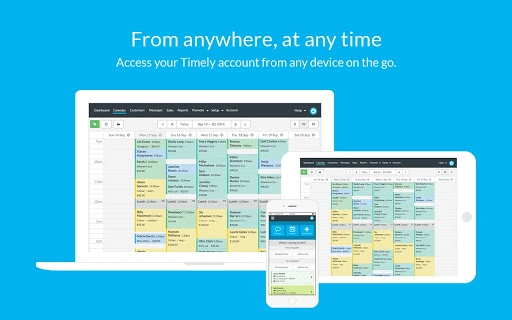
- Appointment Scheduling and Management: A visually intuitive calendar allows users to view, create, and modify appointments with ease. The interface supports drag-and-drop functionality and color-coded categories for different services or staff members.
- Online Booking Integration: Clients can book appointments directly through a customizable website or Facebook page, reducing the need for phone calls and manual coordination.
- Automated Reminders: Timely sends email and SMS notifications to clients before appointments, helping reduce no-shows and improve attendance rates.
- Point of Sale and Invoicing: The platform includes tools for processing payments, tracking inventory, and generating invoices, simplifying financial management.
- Financial and Sales Reporting: Built-in analytics provide insights into revenue, service popularity, and staff performance, supporting data-driven decision-making.
- Client History and Notes: Users can store detailed records of client preferences, past appointments, and special instructions for personalized service delivery.
- Staff Rostering and Commission Tracking: Managers can assign shifts, monitor availability, and calculate individual commissions based on bookings and services rendered.
- Marketing Tools: Integrated SMS marketing and email newsletter features allow businesses to re-engage clients with promotions and updates.
- Mobile Access: Native apps for iPhone and iPad, along with web access from any device, ensure uninterrupted access to the system.
- Online Payment Processing: Supports multiple gateways including Stripe, PayPal, Authorize.net, and eWay, enabling secure and seamless transactions.
- Accounting Integration: Connects with Xero, MYOB, and QuickBooks for synchronized financial data and reduced manual entry.
User Interface, Workflow & Performance
Timely features a clean, modern interface centered around a dynamic calendar. Navigation is intuitive, with clearly labeled menus and consistent layout across desktop and mobile platforms. Users can quickly access key functions such as scheduling, client management, and reporting without navigating through complex hierarchies.
The workflow is optimized for service-based businesses, with logical progression from appointment booking to payment processing and post-service follow-up. The system’s responsiveness is consistent with typical web-based applications, though exact performance metrics were not specified. The developer did not provide detailed information on CPU or RAM usage, so actual resource consumption remains unknown.
Stability appears reliable based on user feedback, with no widespread reports of crashes or data loss. The platform operates smoothly across various devices, maintaining consistent functionality whether accessed via desktop browser, tablet, or smartphone. General software behavior patterns suggest efficient operation under normal usage conditions, but specific benchmarks were not available.
Compatibility & System Requirements
Timely is compatible with Windows, Mac, Linux, Android, and iOS operating systems. The software is accessible via web browser on any device, ensuring broad platform support. A native iPhone and iPad app is available for mobile users seeking enhanced functionality.
The installation size is listed as 2.5 GB, though this may refer to the application bundle rather than the runtime footprint. Exact system requirements were not listed, so users should ensure their device meets general standards for running modern web applications. Compatibility information was partially provided, with no mention of minimum processor speed, RAM, or storage thresholds.
Pros and Cons
Pros
- Intuitive calendar interface for effortless scheduling
- Full suite of online booking and automated reminder tools
- Seamless integration with major payment processors
- Native mobile apps for iOS devices
- Supports accounting software integration (Xero, MYOB, QuickBooks)
- Scalable pricing model based on staff count
- Free customer support via email, phone, and live chat
- Extensive reporting and analytics for business insights
Cons
- Exact performance details were not specified
- Resource usage information not provided
- System requirements were not clearly defined
- May require a stable internet connection for full functionality
- Some advanced features may require a learning curve
FAQ Section
Is Timely compatible with my operating system?
Yes, Timely supports Windows, Mac, Linux, Android, and iOS. You can access it via web browser on any device, or use the native iPhone and iPad apps for mobile access.
Is Timely secure and safe to use?
While specific security details were not provided, the software processes payments through trusted gateways like Stripe and PayPal, which adhere to industry-standard encryption protocols. The platform is designed to protect sensitive client and business data.
How often does Timely receive updates?
Timely regularly releases updates to improve functionality and address user feedback. The development team emphasizes responsiveness to customer suggestions, ensuring ongoing enhancements to the platform.
What type of license does Timely use?
Timely operates on a subscription-based model with no contracts or setup fees. Pricing is based on the number of staff members, with a free version available for users to try.
Can I use Timely offline?
Timely requires an internet connection for full functionality, as it is a cloud-based platform. However, the mobile apps offer limited offline access for viewing schedules, though changes will sync once connectivity is restored.
Final Thoughts + CTA
Timely stands out as a powerful, all-in-one solution for service-based businesses seeking to streamline operations and enhance client experience. Its combination of scheduling, payment processing, staff management, and marketing tools makes it a comprehensive choice for salons, clinics, and wellness studios. The intuitive design, mobile accessibility, and strong integration capabilities further solidify its value.
While detailed technical specifications are limited, the software’s real-world performance and user satisfaction are well-documented through testimonials. For professionals who rely on efficient appointment management and automated workflows, Timely delivers tangible benefits.
Download Timely now
Guides & Tutorials for Timely Appointment Scheduling App for Chrome
How to install Timely Appointment Scheduling App for Chrome
- Click the Preview / Download button above.
- Once redirected, accept the terms and click Install.
- Wait for the Timely Appointment Scheduling App for Chrome download to finish on your device.
How to use Timely Appointment Scheduling App for Chrome
This software is primarily used for its core features described above. Open the app after installation to explore its capabilities.
User Reviews for Timely Appointment Scheduling App for Chrome 0
No reviews found





